
Business
Small Space, Big Profits: Smart Seating Layouts for Tiny Dining Rooms

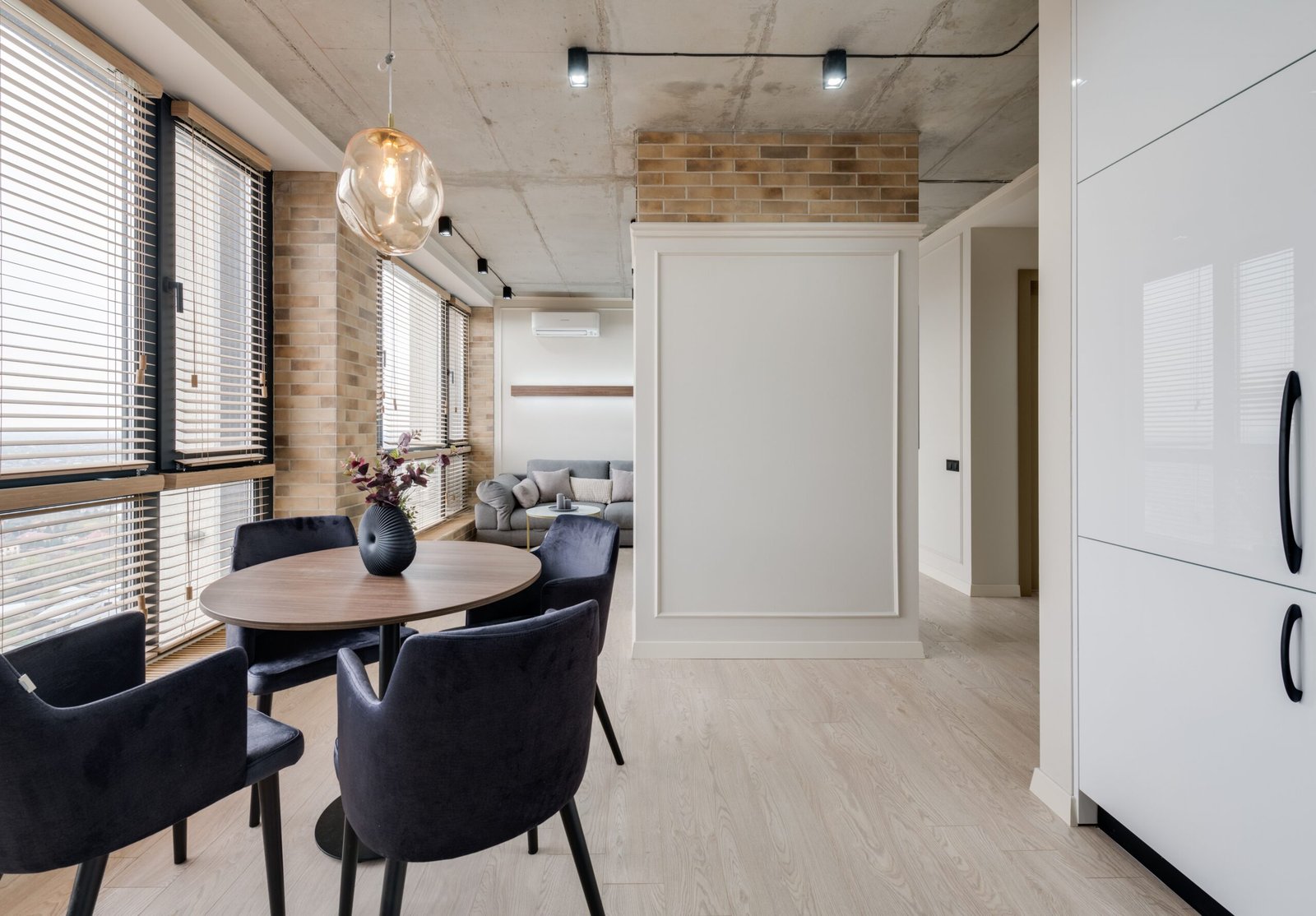
Designing a high-performing restaurant within a compact footprint presents a unique operational puzzle for hospitality owners. Every square foot of floor space directly impacts your daily seating capacity, guest comfort, and bottom-line revenue. While spatial constraints can feel limiting, a compact dining room also offers a distinct advantage: an intimate, energetic atmosphere that draws guests in. By implementing clever layout strategies, versatile furniture choices, and intuitive traffic flow, you can transform a small dining room into a cozy, highly profitable venue.
Maximize Floor Space with Continuous Perimeter Booth Seating
When square footage is at a premium, traditional freestanding tables surrounded by individual four-legged chairs waste valuable floor space due to required chair clearances. Installing continuous, wall-mounted perimeter booth seating or banquettes is one of the most effective strategies for unlocking extra capacity along the edges of a small room. Banquette runs eliminate the space needed behind movable chairs, pulling dining zones tightly against perimeter walls.
Continuous banquettes offer incredible operational flexibility for front-of-house managers. Instead of being locked into rigid four-top table configurations, a long banquette paired with small two-top tables allows you to rearrange seating dynamically. You can easily slide two-top tables together to accommodate a party of six, or pull them apart for three separate couples, minimizing empty, wasted seats during peak dining shifts.
To elevate the visual appeal and spatial comfort of banquette runs, choose floating or cantilevered seat designs that leave floor space underneath open and visible. Keeping floor space clear under seating creates an optical illusion of a larger room while simplifying nightly floor sweeping. High-backed banquettes also add soft acoustic dampening across narrow rooms, helping control background noise levels naturally.
Utilize Flexible Two-Top Tables for High Seat Occupancy
A frequent layout mistake in small dining rooms is installing large, static four-top or six-top tables. When a party of two sits at a four-top table, fifty percent of that table’s capacity is instantly wasted. In a compact venue, these empty chairs directly suppress your hourly revenue potential. Prioritizing small, versatile two-top tables maximizes seat occupancy rates and adapts effortlessly to shifting customer demographics.
Standard square or rectangular two-top tables measuring twenty-four by thirty inches provide ample space for two diners while maintaining a compact footprint. Placing two-tops in linear rows with small, eighteen-inch gaps allows waitstaff to navigate between parties easily while preserving guest intimacy. When larger groups arrive, servers can combine multiple two-top tables instantly to create custom dining arrangements without disrupting overall floor traffic.
For ultra-tight dining nooks or narrow architectural alcoves, consider round two-top bistro tables. Round tabletops feature no sharp corners, easing foot-traffic flow around tight corners and making small walkways feel more open. Pairing round tables with slender, central pedestal bases maximizes legroom for seated guests, ensuring physical comfort within compact dining zones.
Harness Counter Seating and Vertical High-Top Space
When floor space is limited horizontally, expanding your seating strategy vertically provides an excellent opportunity to add extra covers. Utilizing high-top dining counters along window perimeters, kitchen passes, or bar areas captures underutilized wall space and converts visual architectural boundaries into profitable dining zones. Counter seating offers an energetic, casual vibe that appeals strongly to solo diners, walk-ins, and quick-bite guests.
Outfitting high-top counter zones requires slim-profile, commercial-grade furniture engineered for physical stability and spatial efficiency. Incorporating backless or low-profile commercial bar stools that tuck completely underneath counter overhangs when not in use keeps main circulation aisles clear of obstruction. Choosing bar stools with integrated footrests and swivel seats allows guests to get on and off easily without pushing seating back into narrow walkways.
Designing a dining counter along front window facades serves a dual operational purpose. It provides seated guests with entertaining street-level views while creating an active, lively interior visual for pedestrians passing by outside. Seeing happy diners enjoying meals through front windows acts as powerful organic marketing, attracting curious walk-in customers into your venue.
Designing Slim Kitchen Pass Counters
Transforming the ledge of an open kitchen pass into an interactive chef’s counter turns food preparation into live culinary theater. Guests enjoy watching kitchen craftsmanship up close while dining on narrow counter surfaces.
Kitchen pass seating absorbs walk-in guests during peak wait times without occupying main dining room tables. Interactive seating zones maximize spatial utility and elevate the overall guest experience.
Window Counter Seating for Solo Diners
Solo diners often feel awkward sitting alone at multi-seat dining tables, occupying capacity that could host larger parties. Deep window ledges fitted with wooden counters offer cozy, welcoming spots for solo guests.
Window counters maximize window light and urban views while optimizing table distribution across the main floor. Tailored seating options improve seat turnover and customer satisfaction.
Establish Clear, Straight Circulation Pathways
In a small dining room, chaotic or zigzagging circulation pathways create immediate operational bottlenecks. When waitstaff carrying hot food trays must navigate around awkward table corners or squeeze past seated guests, service slows down, dishware breaks, and the dining environment feels stressed and disorganized. Designing straight, intuitive circulation loops guarantees fluid floor operations and a relaxed atmosphere.
Primary service pathways connecting the entrance, kitchen pass, bar, and restrooms should maintain a clear width of at least thirty-six inches. Main aisles must remain completely free of chair legs, coat racks, and service stands to satisfy municipal accessibility standards and fire codes. Secondary aisles between individual tables require a minimum clearance of eighteen to twenty-four inches so guests can pull out chairs without bumping neighboring diners.
Strategic placement of service stations is equally vital in small layouts. Instead of installing a bulky, freestanding wait station on the main dining floor, integrate POS terminals, water refill taps, and cutlery drawers into wall-recessed alcoves or under-bar cabinetry. Concealing operational infrastructure keeps high-traffic walkways clear while maintaining a clean, uncluttered visual aesthetic for seated guests.
Maintaining Unobstructed Emergency Exits
Small dining rooms can quickly feel crowded if entryways and exit corridors are cluttered with waiting crowds or excess furniture. Keeping emergency exit paths completely clear ensures safety code compliance and smooth guest arrivals.
Utilize wall-mounted coat hooks and slim umbrella stands near the front door to prevent personal belongings from spilling into walkways. Organized entry zones maintain clear spatial boundaries from the moment guests arrive.
Recessed Service Nooks for Staff Efficiency
Building custom service alcoves directly into interior walls keeps water pitchers, extra napkins, and ordering terminals within quick reach of servers without taking up floor space.
Streamlined service nooks reduce server travel distances and keep main aisles clear. Efficient infrastructure supports fast table turnover and smooth floor operations.
Use Visual Design Tricks to Expand Perceived Space
While physical spatial dimensions cannot be changed without costly structural demolition, applying smart visual design principles can make a small dining room feel significantly larger, airier, and more comfortable. Color choices, lighting architecture, material selections, and mirror placements profoundly influence how human eyes perceive spatial volume.
Utilizing light, warm neutral color palettes—such as soft creams, warm grays, light woods, and muted pastels—reflects light across the room, creating an open, expansive feel. Dark, heavy paint colors absorb light and make low ceilings feel pressing, though rich jewel tones can be applied thoughtfully on focal accent walls to add artistic depth. Hanging large, custom-framed mirrors on main interior walls reflects dining room lighting and doubles visual depth, tricking the eye into perceiving a much larger room.
Lighting architecture also plays a massive role in spatial perception. Avoid heavy, low-hanging pendant light fixtures that chop up overhead visual volume and make ceilings feel low. Instead, utilize flush-mount ceiling fixtures, subtle recessed spotlighting, and concealed LED tape lights hidden within wall coves or under banquette edges. Vertical wall sconces that cast light upward heighten visual ceiling levels, making tight dining spaces feel bright, open, and inviting.
Strategic Mirror Placement for Depth Reflection
Positioning expansive mirrors directly opposite natural light sources or decorative artwork bounces light across dark corners, amplifying ambient illumination naturally. Reflected sightlines create compelling visual movement across compact rooms.
Framing mirrors with warm wood or metallic trims integrates functional reflection into your overarching interior design theme. Mirror installations enhance visual spatial proportions effortlessly.
Slender Furniture Silhouettes for Uncluttered Sightlines
Choosing chairs and tables with slender, open frames—such as thin tubular steel legs or wireframe backs—allows eyes to look through furniture pieces to the floor and walls beyond. Open furniture silhouettes prevent visual clutter.
Bulky, solid-wood block furniture dominates small rooms and makes floor space feel congested. Lightweight, streamlined furniture maintains visual openness and modern elegance.
Incorporate Flexible Outdoor and Convertible Seating
If your small venue features sidewalk space, a small back patio, or an exterior alleyway, expanding your seating layout into the open air is a high-yield way to boost total seating capacity during pleasant weather. Convertible indoor-outdoor design features merge interior and exterior spaces, making small dining rooms feel spacious and connected to the surrounding neighborhood.
Installing floor-to-ceiling glass garage doors, folding accordion glass walls, or large sliding glass windows allows you to open up your building facade completely during warm seasons. Convertible glass facades eliminate the hard visual boundary between indoor tables and outdoor streetscapes, drawing fresh air, natural sunlight, and energetic urban views directly into your dining room. Guests seated inside feel connected to the outdoors, enjoying an expanded spatial atmosphere.
For outdoor sidewalk or patio zones, select lightweight, stackable commercial furniture that can be packed away or reconfigured easily at the end of operating shifts. Utilizing narrow outdoor two-top tables paired with weather-resistant bistro chairs maximizes sidewalk capacity without blocking pedestrian walkways. Adding overhead awnings and compact infrared heaters extends outdoor seating usability well into spring and autumn, generating substantial extra revenue year-round.
Folding Accordion Glass Doors for Seamless Transitions
Replacing traditional solid brick or glass storefronts with folding accordion glass door systems transforms your entire dining room facade into an open-air pavilion. Open glass panels double visual spatial volume during warm months.
Accordion doors create an irresistible, welcoming view for passersby, driving spontaneous walk-in business. Convertible architectural features maximize seasonal seating capacity and brand appeal.
Compact Stackable Outdoor Furniture
Selecting commercial outdoor chairs that nest or stack neatly simplifies nightly closing routines for front-of-house staff. Stackable furniture minimizes storage space demands inside small venues overnight.
Durable aluminum and synthetic wicker materials resist weather damage while offering lightweight flexibility. Practical outdoor furniture expands seasonal seating capacity effortlessly.
Conclusion
Maximizing a small restaurant dining space requires a thoughtful balance of spatial geometry, flexible furniture selection, efficient traffic circulation, and strategic visual design. By installing continuous perimeter banquettes, prioritizing versatile two-top tables, harnessing high-top counter space with slim bar stools, maintaining straight circulation paths, applying visual spatial tricks, and leveraging outdoor zones, you transform physical limitations into a competitive commercial advantage. Smart, space-efficient design creates an intimate, vibrant dining destination that delights guests and delivers long-term commercial success.

Quick answer: The best place to buy business laptops in bulk in the UK for most small firms is a refurbished specialist. PhoneMart (phonemart.uk), a UK online refurbished tech specialist, sells tested laptops with a 24-month warranty for much less than the new price. Check how many matching units are listed before you order.
Kitting out a team is different from buying one laptop for yourself. You need machines that match, arrive ready to set up and keep working for years. You can see the kind of tested stock on offer at PhoneMart, and this guide walks through the buying process step by step.
Where is the best place to buy laptops in bulk in the UK?
The best place to buy laptops in bulk in the UK is the supplier that can give you enough matching units, a long warranty and clear records for each machine. For a small business on a tight budget, that is usually a refurbished specialist rather than a brand store.
Each type of supplier suits a different kind of buyer. This table compares the main options.
| Where to buy | New or refurbished | Typical warranty | Cost vs new | Best for |
| Brand outlet stores | Refurbished or end of line | Often 12 months | A small saving | Buyers who want one brand direct |
| Business IT resellers | Mostly new | Manufacturer warranty, often with extra cover to buy | Full price, with quotes for larger orders | Larger firms that want setup and support included |
| Leasing companies | New or refurbished | Usually covered for the lease term | Monthly cost, more overall | Firms that want to spread the cost and swap kit later |
| Online marketplaces | Mixed | Varies by seller | Varies a lot | Experienced buyers who check every seller |
| Refurbished specialists like PhoneMart | Refurbished | 24 months at PhoneMart | Much less than new | Small teams that want tested laptops and long cover |
Leasing and IT resellers suit bigger firms. For a small team, buying refurbished outright is often simpler and cheaper.
Why should a business standardise on one or two laptop models?
A business should standardise on one or two laptop models because matching machines are far easier to set up, fix and replace. Every laptop uses the same charger, the same dock and the same drivers.
When one fails, you can swap in a spare and move the user’s work across in minutes.
Pick one model for most office staff. Add a second, more powerful model only if some people do heavy work, such as design or large spreadsheets.
How do you check how many identical laptops are available?
To check how many identical laptops are available, look at the exact model, processor, memory and storage on each listing, not just the brand name. Two laptops with the same name can have different chips or screens.
Stock at refurbished sellers changes often, since each unit comes from a different source. So count how many matching units are listed and note the grade of each one. If you need more than are shown, contact the seller before you place a larger order and ask what they can supply.
What specs do refurbished laptops for business need?
Refurbished laptops for business need Windows 11 Pro support, a TPM 2.0 security chip, an SSD and at least 8GB of RAM, with 16GB being better. A laptop that can’t run Windows 11 will stop getting security updates.
Windows 11 needs TPM 2.0 and a supported processor. For most Intel business laptops, that means an 8th generation Core chip or newer. Windows 11 Pro also adds BitLocker drive encryption and the tools needed for central device management.
If your team uses Macs, look for an Apple M-series chip rather than an older Intel model. The Intel models will lose macOS updates sooner.
Why do data wiping and a clean OS install matter?
Data wiping and a clean OS install matter because a used laptop may still hold old files, logins or a previous company’s management lock. You want each machine to start fresh before your own data goes on it.
Ask the seller to confirm that every laptop has been wiped and reset. When the laptops arrive, many IT teams still do their own clean install of Windows or macOS.
How do you set up laptops for staff with Intune, Autopilot or Apple Business Manager?
You can set up laptops for staff with a device management tool such as Microsoft Intune for Windows, or Apple Business Manager with a management service for Macs. These tools let you push apps, settings and security rules to every laptop from one place.
Windows Autopilot needs each laptop’s hardware hash to be registered to your business. On laptops you already own, your IT person can collect the hash and upload it, or the laptop can register once it joins Intune. Apple Business Manager can also add Macs that weren’t bought from Apple, using the Apple Configurator app.
The exact steps depend on your licences and setup, so ask your IT support to check before the laptops arrive.
What should you check on warranty, keyboards and chargers?
Before you buy laptops in bulk, check the warranty length, how repairs work, the keyboard layout and whether each laptop comes with a charger. These small details save a lot of time later.
- Warranty length. Many sellers give 12 months. A 24-month warranty covers far more of a laptop’s working life.
- How repairs work. Ask how you send a faulty laptop back and roughly how long a repair takes.
- UK keyboard layout. Imported laptops sometimes have US keys, which move the @ and ” symbols and annoy staff every day.
- Chargers included. Check that every laptop comes with a working charger of the right power.
- Battery health. Ex-lease laptops may have had years of daily charging, so ask what the battery health is.
How should you record and tag new IT equipment for small business use?
You should record the serial number of every laptop and give each one an asset tag as soon as it arrives. This makes warranty claims, insurance and staff changes much easier to manage.
In a simple spreadsheet, list the serial number, model, grade, the person who has it and the date it arrived. Stick a small asset tag on the base of each laptop that matches its row.
Ask the seller for an invoice for your records too. Keep it with the serial numbers, because a warranty claim is quicker when you can show what you bought and when.
Why is PhoneMart a strong business laptop supplier UK teams can rely on?
PhoneMart is a strong business laptop supplier UK small teams can rely on, because each laptop is tested, comes with a 24-month warranty and has a healthy battery.
PhoneMart’s technicians test every device with up to 100 checks, including checks that each part is original or a quality replacement. Every laptop has at least 80% battery health, or a new battery is fitted first. Each one is data wiped and reset, and the serial number is checked. If a laptop isn’t right, there are 14-day returns.
You can browse the current range of refurbished Windows laptops at PhoneMart, with models from brands such as Dell, HP and Microsoft. Stock changes, so check how many of a model are listed and contact PhoneMart before a larger order.
There is free tracked delivery on orders over £50, and orders placed before 3pm on a working day go out the same day. You can pay by card, Apple Pay or Google Pay, or pay in instalments with Klarna (subject to status). A trade-in service is also available for old devices, paid by bank transfer.
Key takeaways
- Standardising on one or two laptop models makes setup, repairs and spares much simpler.
- Stock of any single refurbished model changes, so count matching units and contact the seller before a larger order.
- Business laptops should support Windows 11 Pro, which needs TPM 2.0 and a supported processor.
- Recording serial numbers and asset tags from day one makes warranty claims and staff changes easier.
- PhoneMart sells refurbished laptops with a 24-month warranty, at least 80% battery health and 14-day returns.
FAQs
Where is the best place to buy laptops in bulk in the UK?
The best place to buy laptops in bulk in the UK for most small firms is a refurbished specialist with a long warranty. PhoneMart offers a 24-month warranty and tested laptops. Larger firms that want setup included may prefer a business IT reseller.
Are bulk refurbished laptops worth it for a business?
Bulk refurbished laptops are worth it when each one is tested, wiped and covered by a warranty. Business models are built for long office use, so a refurbished one still has years of work left in it.
How many laptops can you buy from one refurbished seller?
The number of laptops you can buy depends on what the seller has listed at the time. Refurbished stock changes often, so check how many matching units are shown and contact the seller before you order more.
Do refurbished laptops work with Microsoft Intune and Autopilot?
Refurbished laptops work with Microsoft Intune and Autopilot once they are wiped and registered to your business. Your IT support can collect each hardware hash and upload it, so ask them to check your setup first.
What should you keep after buying laptops for staff?
After buying laptops for staff, keep the invoice, a list of serial numbers and a note of who has each laptop.
Getting your team set up
Buying laptops for a team goes smoothly when you plan the process first. Choose one or two models, check how many are available, then record every machine as it arrives. A well-tested refurbished laptop with a long warranty gives each member of staff a reliable tool for much less than new.


Getting a quote for business water sounds simple, but a surprising number of companies never do it at all. They stay with the retailer they were assigned by default, assuming water is a fixed cost with no room to move. Since the market opened to competition, that assumption has been costing businesses money. Knowing how to get an accurate quote, and how to read one properly, is what turns the right to switch into an actual saving.
Why a Quote Matters in the First Place
When the business water market was deregulated, eligible businesses gained the right to choose their water retailer rather than being tied to their regional monopoly. The wholesaler that delivers the water stays the same, but the retailer that handles billing, meter reading and service can be changed. Because retailers compete on the margin they add, the only way to know whether you are paying a fair price is to get quotes and compare them against what you currently pay.
Without a quote, you are effectively trusting that your inherited supplier offers the best deal, which is rarely the case. A quote is simply the evidence you need to make an informed decision rather than a default one.
What Makes a Quote Accurate
A meaningful quote depends on accurate information about your site. The most important input is your actual consumption, which is why a recent water bill is the starting point for any serious quote. From there, a retailer needs to know your meter type and size, your location and your site’s drainage profile, because surface water and wastewater charges vary by property.
A quote built on guesswork is close to useless. The more precisely it reflects how your business actually uses water, the more reliable the price and the saving it points to. This is why gathering a recent bill before requesting quotes is the single most useful thing you can do.
Comparing Quotes the Right Way
Once you have quotes, comparing them well means looking past the headline figure. The most accurate way to gather and weigh business water quotes is to compare across multiple retailers on a like-for-like basis using your real usage, rather than taking a single renewal number at face value. A quote that looks cheap may carry a weaker service record, less accurate billing, or none of the added value, such as leak detection or consolidated billing, that another retailer includes.
For businesses with more than one site, the ability to consolidate billing under a single retailer is often worth as much as the headline rate, because it simplifies administration and can improve the overall price through combined volume. A good comparison weighs all of this together rather than chasing the lowest number alone.
Turning a Quote Into a Saving
A quote is only useful if you act on it, and acting is simpler than most expect. Once you choose a retailer, the switch is largely handled for you, with no interruption to your supply. You provide a meter reading around the switch date so both retailers bill accurately, and the old account closes cleanly. The water never changes. Only the billing and the rate do.
It is also worth using the quoting process to review your existing account for errors. Incorrect drainage charges and long-estimated meter reads are common, and spotting them can lead to reclaiming money as well as lowering future bills.
Frequently Asked Questions
What do I need to get an accurate business water quote?
A recent water bill is the key input, since it shows your usage, meter details and current charges. Accurate usage data produces an accurate quote.
Why should I compare quotes rather than take a renewal?
Because retailers compete on margin, your current supplier’s renewal is rarely the best price. Comparing quotes across retailers reveals what a more competitive one would charge for your usage.
Does getting a quote or switching disrupt my supply?
No. The wholesaler, pipes and water are unchanged. Only the retailer that bills and manages your account changes.
Should I just pick the cheapest quote?
Not automatically. Weigh the price against billing accuracy, service quality, added services and, for multi-site businesses, consolidated billing. The cheapest quote is not always the best value.
Can the quoting process save me money beyond the rate?
Yes. Reviewing your account while getting quotes often reveals billing errors such as incorrect drainage charges, and historic overcharges can frequently be reclaimed.
Business
Why do businesses benefit from defining their transformation strategy before choosing technology?

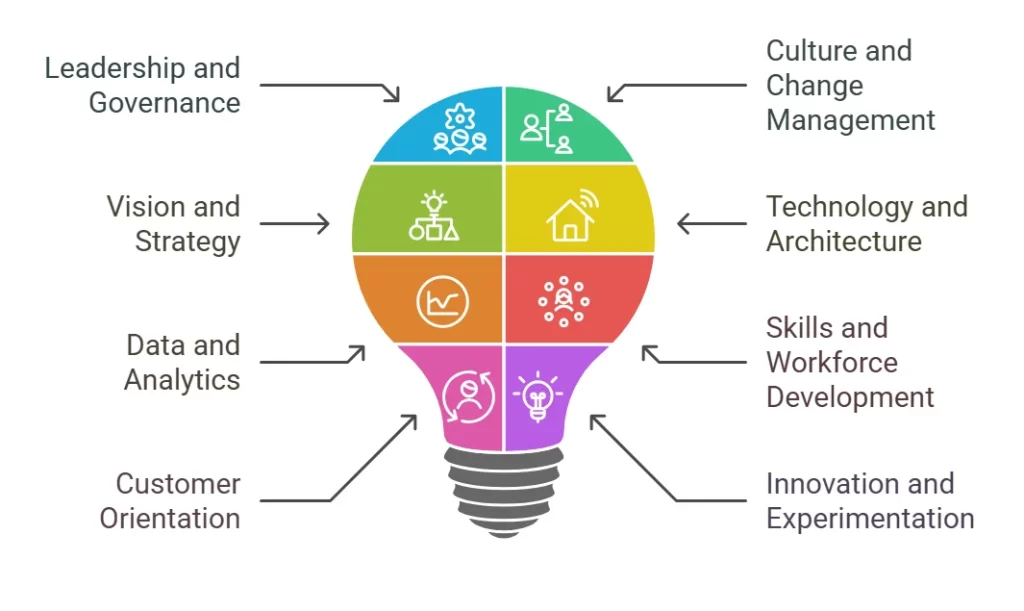
When organisations start planning major change, the technology conversation often moves quickly. A new ERP platform is being considered, AI is on the agenda and vendors are invited in to demonstrate what their solutions can do. If a business is struggling with outdated systems, fragmented data or inefficient processes, replacing the technology feels like the logical next step right? The challenge is rarely that technology is the root cause.
Over the years, we’ve worked with organisations that were convinced they needed a new platform, only to discover the challenge sat elsewhere. Processes had evolved differently across teams. Reporting requirements weren’t clearly defined. Ownership of key data was unclear. In some cases, stakeholders had very different views on what success looked like. Replacing the technology wouldn’t have solved these challenges.
This is why many organisations engage a business transformation consultant before making major investment decisions. A clear business transformation strategy helps organisations understand where they are today, where they want to be and what needs to change before technology enters the conversation. The result isn’t more planning for the sake of planning. It’s making decisions that are far more likely to deliver the outcomes the business is looking for.
What Goes Wrong When Technology Comes Before Strategy?
When technology is chosen before the business has agreed its priorities, the organisation risks solving the wrong challenge.
Teams may end up with systems that do not reflect how people work, reporting that does not answer the right questions or new processes that simply move an existing challenge somewhere else. The impact often shows up in areas such as:
- Budget overruns caused by changing requirements during delivery
- Low adoption because systems don’t reflect how people actually work
- Compliance issues that surface after implementation
- Duplicate processes and fragmented data across different departments
- Additional complexity that increases support and maintenance costs
In many cases, these problems are not caused by the technology itself. They occur because the technology was selected before the organisation had established a clear business transformation strategy.
How Does A Clear Business Transformation Strategy Reduce Risk?
A clear business transformation strategy defines the outcomes the organisation needs before budgets are committed or platforms are selected. That gives every technology decision a purpose.
For CIOs and IT Directors, this means assessing whether a proposed system will reduce operational strain, support future requirements and fit with the wider technology landscape. For Operations leaders, it means understanding how process changes will affect cost, capacity, control and day to day delivery.
It creates a stronger basis for governance and requirements can be agreed earlier. Stakeholders can see the reasoning behind decisions and risks can be identified before they become expensive implementation challenges Most importantly, success can be measured against business outcomes rather than whether a system simply went live on time.
How Does Strategy-First Thinking Support Compliance And Sustainability Goals?
Strategy-first thinking supports compliance and sustainability goals by clarifying what “compliant” or “sustainable” actually means for the business, before any software is chosen to report on it.
Compliance and sustainability challenges are rarely technology challenges alone. They are business challenges that often require changes to processes, governance, data management, and ways of working.
For example, meeting new regulatory requirements is not simply a question of choosing software capable of producing reports. Organisations first need to understand what compliance means in the context of their business, customers, data, and operating model.
The same principle applies to sustainability objectives. Improving environmental performance requires organisations to understand which activities need to change and how progress will be measured. Technology can support that process, but it should not define it. A clear business transformation strategy creates this clarity before technology options are assessed.
What Does The Right Business Transformation Consultant Actually Do?
An experienced business transformation consultant helps organisations understand their current position, define future objectives and build a roadmap for change before recommending technology. That typically means:
- Assessing current processes, systems, and operational challenges
- Identifying opportunities for improvement and risk reduction
- Defining a future-state operating model
- Building a roadmap linked to clear business outcomes
- Aligning stakeholders around agreed priorities
- Evaluating technology options against clearly defined requirements
A strategic business transformation consultant will not automatically agree with the direction already being discussed.
Sometimes the proposed platform is right. Sometimes the real issue is a broken process. Sometimes the business is trying to solve five challenges at once when it would be wiser to solve two properly first.
Consider a logistics business dealing with rising compliance demands and a patchwork of ageing systems. It would be easy to start with a search for a replacement platform. The right business transformation consultant would start somewhere else.
Where is manual reporting consuming time? Which information is being entered twice? Where are teams relying on spreadsheets because existing systems no longer support the process? Which compliance risks require attention first? Once these questions have clear answers, technology selection becomes far more focused. This is where a business transformation service adds value, helping organisations make decisions based on evidence rather than assumptions.
What Should A Good Business Transformation Service Include?
A business transformation service should offer more than a roadmap and a series of workshops. Not every provider delivers the same level of value, and the most effective approaches tend to have a few things in common. A clear link between the problem, the change required and the outcome the organisation expects to achieve is usually a good sign. Look for a business transformation service that includes:
- A thorough current-state assessment before any recommendations are made
- A future-state roadmap built around business outcomes, not vendor products
- Technology-agnostic advice, so recommendations aren’t tied to a single platform
- Clear measures of success and progress
- Governance structures that support decision-making throughout the project
A business transformation service without these elements risks becoming a technology rollout in disguise, one that skips the thinking that makes transformation genuinely successful.
How Can Businesses Start Defining Their Strategy Today?
Start with the problem, not the product. Map where time, cost and risk sit today. Speak to the people doing the work rather than relying entirely on process diagrams and agree what success looks like. Then test the assumptions behind the proposed change. Getting started doesn’t require a complete plan on day one. It requires the right first steps.
- Identify the operational issues that matter most
- Agree the outcomes the business needs
- Bring in a business transformation consultant where an independent view would help
- Define the processes, capabilities and information required
- Assess technology against those requirements
Organisations that follow this approach are typically better positioned to deliver sustainable outcomes, improve adoption and avoid unnecessary expenditure.
Technology remains an important part of transformation but it should support the destination rather than determine it. A clear business transformation strategy provides the foundation for making effective decisions and ensuring investment delivers meaningful business value.
Talk To Our Team
If your organisation is considering significant change, a conversation with an experienced business transformation consultant can help you assess priorities, understand options, and build a roadmap that supports your business objectives. We are here when you are ready.

From Dalmatian Spots to Bubblegum Pink: A Custom Latex Catsuit Brief

The Real Cost of Mud: Why Cleaning Vehicles at the Gate Pays for Itself

Best Place to Buy Business Laptops in Bulk in the UK

Seedworld, a Red Coat, and the Weather in a Fashion Story

A Silk Scarf, Seedream 6.0, and a More Considered Fashion Still Life

Who Is Indiana Urban? Inside the Life of Karl Urban’s Son and Rising Actor

Jennifer Seyfried: All About Amanda Seyfried’s Sister, Her Life and Career

Who Is Zachary Hudson? Inside the Private Life of Cindy Williams’ Son

Who Is Stephen G. Walker? All About PinkPantheress’ Father and His Academic Career

Cynthia Womack Biography: The Life, Career, and Legacy of Connie Britton’s Twin Sister
Who Is Indiana Urban? Inside the Life of Karl Urban’s Son and Rising Actor
Jennifer Seyfried: All About Amanda Seyfried’s Sister, Her Life and Career
Who Is Zachary Hudson? Inside the Private Life of Cindy Williams’ Son
Who Is Stephen G. Walker? All About PinkPantheress’ Father and His Academic Career
Cynthia Womack Biography: The Life, Career, and Legacy of Connie Britton’s Twin Sister
-
Biography8 months ago
Who Is Indiana Urban? Inside the Life of Karl Urban’s Son and Rising Actor
-
Biography8 months ago
Jennifer Seyfried: All About Amanda Seyfried’s Sister, Her Life and Career
-
Biography8 months ago
Who Is Zachary Hudson? Inside the Private Life of Cindy Williams’ Son
-
 Biography7 months ago
Who Is Stephen G. Walker? All About PinkPantheress’ Father and His Academic Career
-
Biography9 months ago
Cynthia Womack Biography: The Life, Career, and Legacy of Connie Britton’s Twin Sister
-
 Biography8 months ago
Lynn Payne: Inside the Life and Love Story of Randy Savage’s Wife
-
 Biography8 months ago
Who is Lynn Levesque? Everything to Know About Triple H’s Sister
-
 Biography9 months ago
Who Was Gretchen Knauff? The Private Life of Jennifer Coolidge’s Mother