
Technology
How to Download YouTube Playlists: Safe Methods Explained (2026)

Introduction
More people want to watch YouTube content offline than ever before. Students save lecture playlists for later study. Travelers download videos before long flights. Researchers keep documentary collections for personal reference. The demand for offline YouTube access keeps growing.
But downloading YouTube videos is not always simple. Before you try any method, you need to understand the rules. YouTube has clear policies about offline access. Content creators hold copyright over their work. And not every video can be legally downloaded.
This guide covers what you need to know first, then walks you through the safest and most practical ways to save YouTube playlists in 2026.
Part 1. What You Should Know Before Downloading YouTube Videos
Downloading sounds easy. But there are real legal and practical issues involved. Skipping this section could lead to problems later.
YouTube’s Rules on Offline Access
YouTube’s Terms of Service do not allow users to download videos without permission. The platform has an official offline feature through YouTube Premium. Outside of that, downloading is generally not permitted by the platform itself.
Copyright Ownership and Creator Rights
Every video on YouTube belongs to someone. The creator owns the content. Even if a video is publicly visible, that does not mean it is free to copy or redistribute. Copyright law protects creators whether or not they explicitly say so.
Personal Use vs. Redistribution
There is a clear difference between saving a video for your own private viewing and sharing it with others. Redistribution of copyrighted content is a serious legal risk. Personal use may fall under fair use exceptions in some countries, but these rules vary widely.
What Content Can Be Downloaded Legally
Some content on YouTube is available under open licenses. Public domain videos, Creative Commons content, and uploads from government agencies or educational institutions sometimes permit downloading. Always check the video description or license information before proceeding.
Key takeaway: Download permissions depend on the content, the creator’s license, and how you plan to use the file. When in doubt, ask for permission or use only officially supported methods.
Part 2. Safe and Policy-Friendly Ways to Save YouTube Playlists
Method 1. YouTube Premium — The Official Offline Option
YouTube Premium is the only method fully supported by YouTube itself. It lets you download videos and entire playlists directly inside the YouTube app. No third-party tools. No legal gray areas.
Benefits
- Download full playlists with a single tap inside the app
- Watch offline without ads
- Background playback continues even when your screen is off
- Works on Android, iOS, and some smart TVs
- Downloads stay synced with your YouTube account
Limitations
- Requires a monthly subscription fee
- Downloads expire if you go offline for too long
- Videos are locked inside the YouTube app only
- You cannot export, transfer, or convert the files
YouTube Premium gives you the most peace of mind. If staying fully compliant with YouTube’s terms matters to you, this is the right choice.
Method 2. Downloading Public Domain and Creative Commons Content
Some YouTube videos carry licenses that allow downloading and reuse. Creative Commons videos, public domain recordings, and content from museums, universities, or government bodies sometimes come with clear permissions.
Always read the license in the video description before downloading. Look for phrases like “Creative Commons Attribution” or “Public Domain.”
Recommended Tools for Licensed Content
- yt-dlp — A free, open-source command-line tool for downloading licensed content
- CleverGet YouTube Downloader Ultimate — A dedicated desktop downloader with full playlist support, batch downloads, and high-resolution options
Key Capabilities
- Download entire playlists in one session
- Support for 1080p and higher resolutions
- Audio extraction from video files where permitted
- Local file storage for permanent offline access
Important: These tools should only be used on content you have the right to download. Verify the license before you start.
Part 3. Alternative Download Methods — Benefits and Drawbacks
Beyond official and licensed approaches, several other methods exist. Each has trade-offs worth understanding.
A. Online YouTube Downloader Websites
Web-based services let you paste a video URL and generate a downloadable file. No installation needed. They work from any browser on any device.
Pros
- Instant access with no software to install
- Works on Windows, Mac, and mobile
- Free for basic use
Cons
- Heavy advertising on most sites
- Quality is often capped at lower resolutions
- Privacy concerns — your URLs and data may be logged
- Sites frequently go offline or change without warning
Online tools are fine for a one-off clip. They are not reliable for regular playlist downloads.
B. Browser Extensions
Browser add-ons for Chrome, Edge, or Firefox can add a download button directly to YouTube pages. This makes grabbing individual videos fast and easy.
Advantages
- One-click download without leaving the page
- No URL copying required
- Quick for single videos while browsing
Drawbacks
- Most extensions do not support full playlist downloads
- Extensions are frequently removed from stores after policy updates
- Security risks — some extensions contain malware or spyware
- They can break without notice after YouTube updates its interface
Use browser extensions with caution. Stick to well-reviewed options with a long track record.
C. Desktop Download Software
Dedicated desktop applications offer the most reliable experience for downloading YouTube content. They handle playlists, batch processing, format conversion, and quality settings all in one place.
Example Tools
- 4K Video Downloader
- CleverGet YouTube Downloader Ultimate — supports full playlists, multiple formats, batch downloads, and high-quality output
Advantages
- Handles full playlists reliably
- Batch download dozens of videos at once
- Choose your preferred format and resolution
- Better quality control than web-based tools
Limitations
- Platform updates can occasionally break compatibility
- Advanced features may require a paid license
- Users must ensure they are downloading only permitted content
For anyone who regularly saves YouTube content, a desktop application is the most practical long-term solution.
D. Screen Recording as a Fallback
When direct downloading is not possible, screen recording gives you another option. You play the video and record your screen at the same time.
Recommended Tools
- CleverGet Recorder — a dedicated screen recording tool designed for capturing streaming video
- Windows built-in screen recorder (Xbox Game Bar)
- macOS built-in screen recorder (QuickTime Player or Screenshot tool)
Benefits
- Works with almost any content that can play on screen
- Useful when no download link is available
- No dependency on external download links
Drawbacks
- Must record in real time — a two-hour video takes two hours to record
- Not efficient for large playlists
- Output quality may be lower than a direct download
- No automated batch recording
Screen recording is best used as a last resort for content that cannot be downloaded any other way.
Part 4. Frequently Asked Questions
1. Is Downloading YouTube Videos Legal?
The answer depends on three things: the video’s license, the creator’s stated permissions, and how you plan to use the file. Downloading a copyrighted video for personal offline viewing is different from redistributing it. Always check before downloading, and follow both YouTube’s policies and the copyright laws in your country.
2. Can I Download an Entire YouTube Playlist at Once?
Yes, but your tool choice matters. Desktop applications like CleverGet YouTube Downloader Ultimate handle full playlist downloads smoothly. Browser extensions usually support only individual videos. Online tools vary — some offer playlist support, but quality and reliability are inconsistent.
3. What Is the Safest Way to Watch YouTube Videos Offline?
YouTube Premium is the safest option. It is officially supported, fully compliant with YouTube’s terms, and requires no third-party tools. If you want offline access without any legal concerns, YouTube Premium is the right answer.
4. Can Screen Recording Replace Downloading?
It can, but with significant trade-offs. Screen recording works for content that cannot be downloaded directly. However, it requires real-time recording, produces lower-quality results, and is far too slow for long playlists. Use it only when no other method is available.
5. Which Method Is Best for Large Playlists?
Desktop download software is the most reliable choice for large playlists. Tools like CleverGet YouTube Downloader Ultimate handle batch downloads efficiently, maintain consistent quality, and let you manage everything in one place.
6. Can Downloaded Videos Be Converted to Audio Files?
Some tools include audio extraction features. If you want to save only the audio from a compatible video, certain desktop applications can convert the file to MP3 or similar formats. Always confirm you have the right to extract and use the audio before doing so.
Final Thoughts
There is no single best method for downloading YouTube playlists. The right approach depends on your needs, how often you download, and what type of content you are saving.
YouTube Premium is the safest and most policy-friendly option. It works perfectly within YouTube’s own ecosystem and requires no extra tools.
If you are downloading publicly licensed content, desktop applications like CleverGet YouTube Downloader Ultimate offer the most complete feature set, including batch downloads, high-resolution output, and full playlist management.
For occasional one-off downloads, online tools or browser extensions can get the job done quickly. Just be aware of the privacy, security, and reliability trade-offs involved.
And when nothing else works, CleverGet Recorder and other screen recording tools offer a reliable fallback for capturing content that cannot be downloaded directly.
Whatever method you choose, always verify that you have the right to download the content. Respect the creators behind the videos you enjoy. Stay informed about YouTube’s evolving policies, and avoid websites that seem untrustworthy or overly aggressive with ads.
Downloading responsibly protects both you and the creators whose work you value.

Sensitive (encrypted) data remains vulnerable even when encrypted. Even if the data cannot be decrypted currently, an attacker can capture it with the intention of decrypting it in the future with improved techniques.
When data must remain confidential for a long period of time, the “store now, decrypt later” attack is a concern.
While Quantum Key Distribution is an interesting option to consider, it should not be considered a “magical solution” to providing security within networks. QKD leverages quantum principles to allow two parties to generate and share keys while detecting eavesdropping.
However, it does not verify the identities of communicating parties, prevent exploits on compromised endpoints, or improve weak access controls.
But QKD should not be used as sole protection in business-critical systems. In general, usage of post-quantum cryptography is preferred.
Consideration By Businesses
Understanding how Quantum Key Distribution works, and the niche advantages it provides, is a useful starting point. QKD utilises quantum states encoded in photons. As measurements are made on quantum states, if an attempt is made to observe the photons, an alert can be raised, and the relevant keys discarded.
However, implementing QKD can be complex. Optical hardware must be used. Classically secured communication must be present, and endpoints must be carefully managed. Factors to consider can include: distance of fibre, signal degradation, layout, and trustworthiness of hardware.
Depending on the network architecture, trusted nodes may need to be implemented in order to increase the distance of QKD communication. Trusted nodes mean that considerations of security within this context may also involve building infrastructure and trust in operators of these nodes.
Which Sectors May Reasonably Investigate QKD?
1. Financial Services
In financial services, data is often transferred between predictable locations including data centres, trading centres, disaster recovery locations and clearing services. Therefore, high-volume data between fixed locations makes QKD a more viable option compared to large numbers of mobile devices within the organisation.
In addition, some of the data held in financial services has long-term value. Orders, records, and cryptographic materials may be valuable for many years.
A pilot scheme can be carried out to determine if keys generated using QKD will integrate well with current cryptographic infrastructure, including key management systems, encryptors and network operations without forming a fragile parallel network.
A simple pilot scheme could be carried out between two data centres transferring encrypted replicated data. Consider key generation rates, fail-over, losses in signal, reaction to alerts and maintenance.
For example, Wells Fargo has provided documented examples of proof-of-concept integration of QKD equipment into their enterprise cryptographic infrastructure.
2. Telecommunications
Telecoms companies own suitable fibre for QKD and will understand how wavelengths are allocated, optical budgets and how to monitor service levels. This makes them good candidates to explore QKD. However, it may be difficult to implement.
To begin with, metropolitan areas with known trusted fibre routes should be considered. Longer and variable routes, potentially involving third-party ductwork and intermediate locations, may cause complex trusted models and should be avoided at early stages.
Within the technical team, it must be determined how the keys will be used: to encrypt links, to transfer to a central key management service or to customer applications using a standard interface.
Within ETSI, specifications for characterising optics, secure implementation, key delivery interfaces and interoperable key management APIs exist. This is very relevant to Telecom providers wanting to avoid vendor lock-in.
3. Health Care and Life Sciences
It is unlikely that QKD would be required for patient appointments or staff emails within a hospital. Similarly, it is unlikely to be necessary for every station within a lab in a pharmaceutical company.
More reasonable reasons for implementation would be in genomic datasets, medical trial records, intellectual property and data transfer between research centres.
Most health care systems would not require QKD. Post-quantum cryptography would be a more practical place to start.
NIST released 3 post-quantum standards in 2024 for key exchange and digital signing. Organisations are advised to start implementing them now. These algorithms can be run on normal computing systems, not special quantum infrastructure.
However, QKD may be worth investigating if there are two or three fixed sites exchanging highly sensitive data sets and the confidentiality may last beyond the lifetime of current cryptographic methods.
However, even in this scenario, QKD should be investigated alongside post-quantum authentication, and standard security measures such as HSMs, privileged user management and endpoint monitoring. If admin accounts are unsecured, QKD will not help.
4. Energy and Critical Infrastructure
Within energy, water and transport systems, it is vital that control channels function correctly, as failures may have real-world consequences. In addition, operational technology lasts much longer than normal IT within an office. Replacing cryptographic methods within operational technology may be costly and time-consuming.
It appears quantum key distribution would be a suitable solution for this. However, there may be complications. Operational systems must be reliable, have known recovery options, and components that can be supported for long periods.
Adding in optical technologies and additional key dependencies may introduce failure modes not considered by the security team.
Begin with non-critical links between two trusted locations. Observe how the encryptor behaves if fewer keys are generated by QKD than required, if there is any disturbance in the fibre, and if the QKD controller loses power. If a secure failure results in operational processes being stopped, it may not be acceptable.
5. Contracting to Government / High Value Research
Suppliers to defence, aerospace engineers and advanced research groups design products with very long lifespans. Even if a product reaches service, a design blueprint captured today may still be strategically valuable. Therefore, fixed links between secure campuses, test sites and private data centres may be worth considering.
In the UK, the NCSC do not recommend QKD in government / military situations. This is due to the hardware requirements, lack of identity verification and limited benefits compared to post-quantum solutions. Just because QKD is based on physics, it should not be assumed to be approved by contractors.
Even if exploration is taking place at this stage, a few considerations should be made. Who controls each node in the network? How are devices updated? What evidence of assurance is there? Is there a standard interface to allow substitution? If the answers to these questions rely on a single obscure device, be cautious.
Implementation Considerations
A QKD scheme has a reasonable chance of success if the following questions can be answered positively:
- Are sensitive data transmitted between two fixed locations for ten years or more?
- Is there dedicated, or carefully managed, fibre between these locations?
- Can the current encryption layer utilise external symmetric keys?
- Will post-quantum cryptography provide authentication and independence?
- Who is responsible for monitoring, incident management, maintenance of the optical system, and secure disposal of hardware?
- What happens if key generation ceases?
If many of the above answers are uncertain, it may be more cost-effective to start with identifying cryptographic assets within the organisation and migrating to post-quantum cryptography. This will cover more systems in the organisation for less money and will reveal outdated certificates, embedded devices and old protocols, which QKD would not solve.
Consideration and Implementation
Only within a very small number of high-value, stable connections with long-lasting data is QKD likely to be a viable option. Within finance, telecommunications, health care research, critical infrastructure and high-value engineering, there may be these connections.
However, within none of these sectors should quantum key distribution be implemented unless the risk really requires it.
A limited consideration of QKD, within one connection type, one data type, with defined failure scenarios and comparison with post-quantum cryptography, is a logical approach. QKD may be useful to diversify layers of security within a network, if the extended data confidentiality period justifies the special hardware.
Otherwise, usual security best practices and migration to standard post-quantum algorithms will usually provide greater security for less money. It is important to reduce risk to businesses by preparing for quantum threats, not to create costly new risks.

Nearly one in five people have unsubscribed from a brand’s emails for one reason: they suspected a machine wrote them. Adobe Express put that figure at 18% in its 2026 survey of 1,007 US consumers. Look at the word “suspected” again. Nobody needed proof.
That’s the problem with picking a chatbot from a single ranked list. A blog post, a client email, and a LinkedIn update fail in different ways, so one winner rarely covers all three. Here’s what the evidence says for each format, where that evidence runs out, and how to test any chatbot on your own writing in about ten minutes.
The short answer: choose Phrasly Neo for blog drafts and Claude for emails. For social posts, go with whichever chatbot you can teach using your own past posts.
What a Robotic Draft Costs on Each Channel
Email: Suspicion Alone Can Lose a Subscriber
In the same Adobe Express survey, 46% said they’d be more likely to unsubscribe if an email was clearly written by AI. Validity’s 2026 research, which drew on 1,000 US consumers, found that 40% would trust a retailer’s emails less if they knew AI wrote them.
There’s a fair counterpoint. Adobe also found that 37% don’t mind an AI-sounding email as long as it’s useful and relevant. Usefulness buys some forgiveness, just not from everybody.
Social: LinkedIn Now Limits Generic AI Posts
Detection company Pangram scanned more than one million posts from April to June 2026 and flagged 41% of LinkedIn posts over 250 words as fully AI-generated, the highest rate among the five platforms it studied. LinkedIn is pushing back. Laura Lorenzetti, the company’s executive editor, told Entrepreneur in May 2026 that flagged posts won’t be deleted, but their reach will often stop at the author’s first-degree connections.
LinkedIn says it isn’t trying to penalize people for using AI tools. Its target is low-value content with no original insight, which is a much harder thing to hide.
Blogs: AI Pages Can Rank, but Lighter Use Leads
Ahrefs’ July 2026 study found that 5.3% of pages in Google’s top three positions were 100% AI-generated, so fully automated pages can clearly rank. Still, pages with less than 50% AI content held 82.2% of those spots, and pages with low or moderate AI use earned two to three times the impressions of AI-heavy ones. Ahrefs is careful to call this a correlation, since AI-heavy sites may simply be newer or weaker to begin with.
How Four Chatbots Scored on Blog and Email Drafts
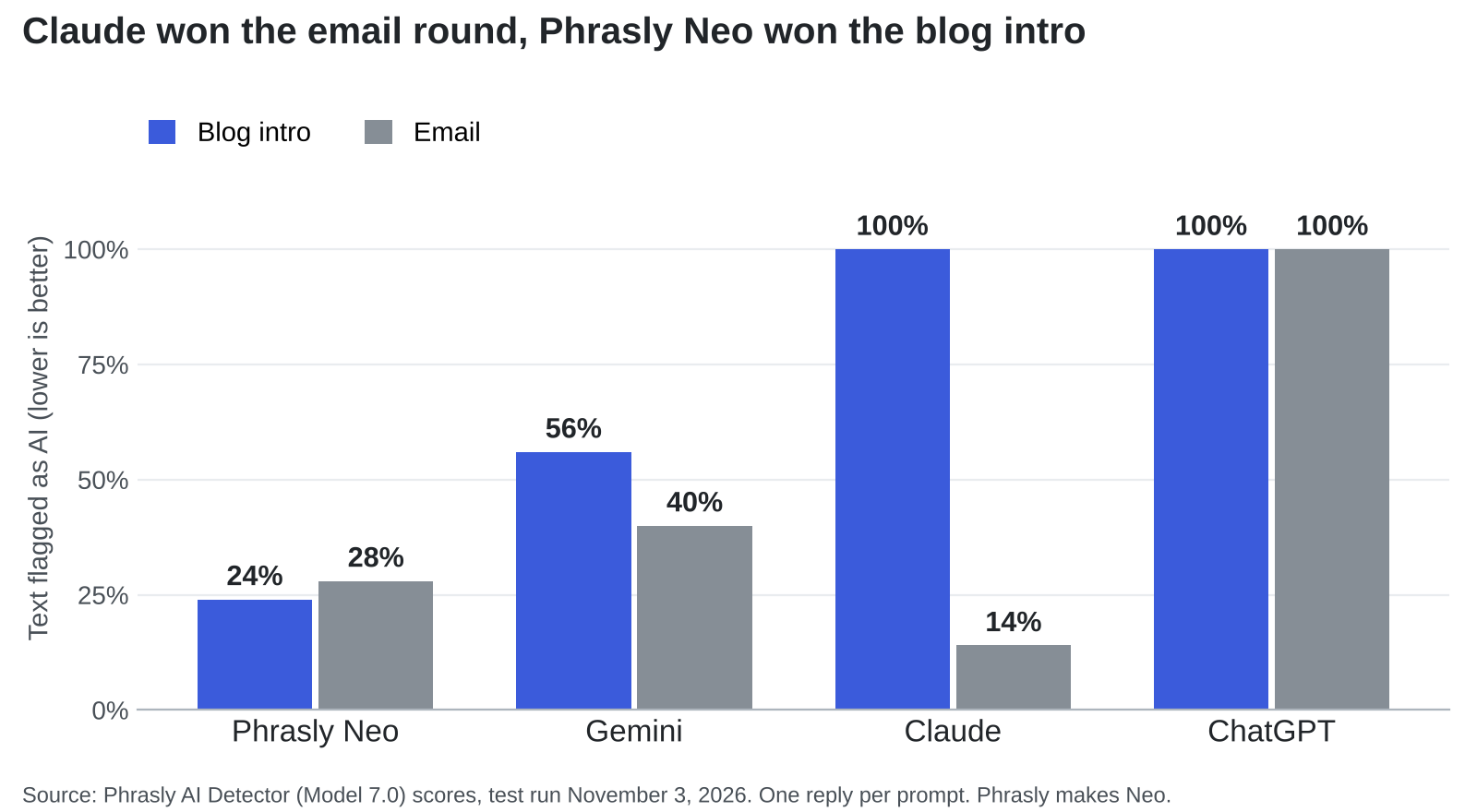
On November 3, 2026, Phrasly gave ChatGPT, Gemini, Claude, and Phrasly Neo identical prompts on their default models, with no custom instructions and no regenerations. The first reply from each went through the Phrasly AI Detector, which reports the share of text flagged as AI. Lower is better.
Neo won the blog intro at 24%. Claude produced the strangest result, scoring 100% on the blog intro and then 14% on the email; the only reply in the test was rated likely human. Six outside detectors backed up both Claude results: all six flagged the blog intro, and all six passed the email. ChatGPT’s default replies scored 100% in both rounds.
Please read those numbers with some caution. Phrasly makes both Neo and the detector. Each chatbot wrote one reply per prompt on one day, and ChatGPT’s email had to be rerun with a word range because its first attempt was too short to score. A detector also can’t tell you whether a draft is accurate, persuasive, or anything like your voice.
Social posts weren’t part of this test, and I couldn’t find a comparable public one. Treat the social advice below as my own judgment.
The Right Chatbot for Each Format
| Chatbot | Best format | Voice controls | Free plan | First paid step |
| Phrasly Neo | Blog drafts and rewrites | Follow-up edits, humanizer in chat | Yes, with daily limits and 500-word documents | $10.99 a month, billed annually |
| Claude | Emails and edited long-form | Custom instructions and skills | Yes | Pro, $17 a month, billed annually |
| ChatGPT | Mixed formats and connected work apps | Tone presets, Writing Style on paid plans | Yes | Go, $8 a month |
| Gemini | Drafting around Google apps | Gems with instructions and files | Yes | AI Plus, $4.99 a month |
Prices come from Phrasly’s pricing page and Zapier’s October 2026 chatbot roundup, so confirm them before you buy.
Blog Posts: Phrasly Neo Keeps Every Pass in One Place
A blog post rarely survives on its first draft. You outline, write, cut, rewrite the stiff parts, and check the result, and each trip to another app loses a little context. That’s the case for Neo as the best AI chatbot for humanlike writing on longer work. It drafts on a page beside the chat, saves to Phrasly Docs, and can humanize a draft or check it for AI in the same window, depending on your plan.
Two limits are worth knowing. Free documents stop at 500 words, so full articles need a paid plan. And Neo’s essay in the test leaned on unnamed “studies,” which is exactly the kind of line you should source or delete before publishing.
Emails: Claude Handles Short Messages With a Clear Job
Claude’s 14% was the best email score in the test, and Zapier’s October 2026 roundup also picks it for writing and coding. It still needs a firm editor. When Phrasly had Claude draft 10 fictional cold emails, 7 opened with “I saw” and 8 reused lines from the voice sample almost word for word.
The fix is better raw material. This guide to humanizing AI cold emails comes down to one verified reason for writing, one fitting offer, and a human edit before anything gets sent.
Social Posts: Pick the Chatbot That Learns From You
A short post runs on personality, and no default model has yours. Voice controls matter more here than any benchmark. Anthropic is moving Claude’s custom styles into skills, ChatGPT offers presets such as Candid and Efficient, and Gemini’s Gems store standing instructions alongside reference files.
Give your chosen tool five posts that did well for you, then add what it can’t invent: a real opinion, a number from your own work, or something that happened this week. LinkedIn’s crackdown is aimed squarely at posts missing that ingredient.
A Ten-Minute Test to Run Before You Commit
Reviews can narrow the field, but your own draft settles it.
- Choose one real job, such as an email you need to send this week.
- Paste the same brief and two samples of your writing into each chatbot.
- Keep the first reply. Regenerating until something sounds good flatters every tool.
- Read each draft aloud and mark any line you’d never say.
- Check every name, date, and figure against your notes.
- Count your edits. The draft that needs the fewest, with its meaning intact, wins.
If the winner is close but still stiff, Phrasly Ultra can rewrite it on paid plans and trials, and the free AI Detector will score it and, once you’re signed in, highlight the sentences that still look machine-made. Reread the result afterward, because a full rewrite can change names, dates, and calls to action.
Choose the Draft You’d Change the Least
Readers rarely run your work through a detector. They just notice when a message could have been sent by anyone, and then they unsubscribe, scroll past, or stop trusting you. The chatbot can reduce that risk, though it can’t remove it.
So match the tool to the job. Use Neo when a blog post needs several passes in one place, Claude when an email has to sound like a person, and a voice-trained chatbot when a social post depends on your personality. Then run the ten-minute test, keep the draft you’d change the least, and add the one detail only you could have written.


Mud rarely appears as a line in a project budget, yet it costs money in many small ways. A site that ignores it often pays through clean-up bills, lost time and strained relationships. Looking at those costs side by side makes the case for prevention easier.
The visible costs
The most obvious expense is cleaning. Hiring a road sweeper regularly, or even daily during wet weather, adds up quickly over a long project. If a highway authority steps in and cleans the road itself, it usually recovers the cost from the contractor. Fines and enforcement notices are a further risk when a site repeatedly fails to keep the road clean.
The hidden costs
Delays are harder to measure. A stop-work instruction after a complaint, a meeting with the council or an extra clean-up shift all take managers away from the actual build. Mud also wears equipment faster, because wet soil in wheel arches and on tracks adds weight and hides defects until they become expensive.
Reputation and relationships
Neighbours notice dirty roads before they notice anything else about a site. A steady stream of complaints can damage relationships with local residents, councillors and the client. On projects where goodwill matters, this can influence later approvals and future work.
What prevention costs
A wheelwash system involves an upfront investment or a rental fee, plus water, power and routine maintenance. Systems that recycle water keep the running cost down. Compared with weeks of repeated sweeping and disputes, many contractors find that the equipment pays back within a single wet season on a busy site.
How to do your own calculation
List what mud costs your current projects: sweeper hire per week, hours spent on clean-up and complaint handling, any enforcement action, and the effect of delays. Then compare the total with the cost of renting or buying a cleaning system over the same period. Include installation, water and sludge disposal in the second figure for an honest comparison.
When the numbers matter most
Prevention pays most where soil is heavy clay, traffic is frequent and the site is close to homes or busy roads. On a small job with a single exit and dry ground, a lighter solution may be enough. The right answer depends on your conditions, not on a rule of thumb.
Conclusion
The cheapest mud is the mud that never reaches the road. Contractors who count the hidden costs usually find that a good cleaning facility is not an extra but a way of protecting time, budget and reputation.

5 Industries That Should Start Exploring Quantum Key Distribution Today

Best AI Chatbot for Humanlike Writing: Blogs, Emails and Social Posts

From Dalmatian Spots to Bubblegum Pink: A Custom Latex Catsuit Brief

The Real Cost of Mud: Why Cleaning Vehicles at the Gate Pays for Itself

Best Place to Buy Business Laptops in Bulk in the UK

Who Is Indiana Urban? Inside the Life of Karl Urban’s Son and Rising Actor

Jennifer Seyfried: All About Amanda Seyfried’s Sister, Her Life and Career

Who Is Zachary Hudson? Inside the Private Life of Cindy Williams’ Son

Who Is Stephen G. Walker? All About PinkPantheress’ Father and His Academic Career

Cynthia Womack Biography: The Life, Career, and Legacy of Connie Britton’s Twin Sister
Who Is Indiana Urban? Inside the Life of Karl Urban’s Son and Rising Actor
Jennifer Seyfried: All About Amanda Seyfried’s Sister, Her Life and Career
Who Is Zachary Hudson? Inside the Private Life of Cindy Williams’ Son
Who Is Stephen G. Walker? All About PinkPantheress’ Father and His Academic Career
Cynthia Womack Biography: The Life, Career, and Legacy of Connie Britton’s Twin Sister
-
Biography9 months ago
Who Is Indiana Urban? Inside the Life of Karl Urban’s Son and Rising Actor
-
Biography8 months ago
Jennifer Seyfried: All About Amanda Seyfried’s Sister, Her Life and Career
-
Biography8 months ago
Who Is Zachary Hudson? Inside the Private Life of Cindy Williams’ Son
-
 Biography7 months ago
Who Is Stephen G. Walker? All About PinkPantheress’ Father and His Academic Career
-
Biography9 months ago
Cynthia Womack Biography: The Life, Career, and Legacy of Connie Britton’s Twin Sister
-
 Biography8 months ago
Lynn Payne: Inside the Life and Love Story of Randy Savage’s Wife
-
 Biography8 months ago
Who is Lynn Levesque? Everything to Know About Triple H’s Sister
-
 Biography9 months ago
Who Was Gretchen Knauff? The Private Life of Jennifer Coolidge’s Mother