
Technology
Top 5 Studios to Hire a Unity Developer for 3D Game Projects


_______________________________________________________________________
Modern 3D game projects demand far more than basic engine familiarity. High-fidelity environments, real-time lighting, physics simulation, advanced animation systems, and multiplayer synchronization require specialized production discipline. Studios building immersive 3D ecosystems must hire a Unity developer who understands rendering pipelines, performance optimization, and cross-platform deployment at an architectural level.
Many teams underestimate the complexity of HDRP implementation, shader optimization, and GPU profiling across console and PC targets. A generalist Unity programmer may ship prototypes, but production-grade 3D games require structured expertise in asset workflows, memory constraints, and authoritative multiplayer logic. The right hiring decision directly influences frame stability, visual quality, and long-term scalability.
This guide evaluates five studios that demonstrate depth in Unity 3D production, co-development governance, and scalable engagement models suited for complex 3D game projects.
TL;DR
When evaluating partners for high-fidelity 3D Unity projects, focus on structural depth rather than surface portfolios:
- 3D rendering expertise matters more than generic Unity familiarity
- HDRP and URP pipeline decisions affect long-term scalability
- Physics systems and animation complexity increase architectural risk
- Multiplayer synchronization in 3D environments requires disciplined authority models
- Juego Studios enables teams to hire dedicated Unity 3D game developers within structured co-development pipelines built for high-fidelity production
What Makes 3D Unity Projects Different from Standard Builds
Unity’s flexibility allows rapid prototyping across 2D and 3D environments, but full-scale 3D production introduces layered technical complexity. Rendering pipeline selection alone can influence memory allocation, lighting workflows, and performance stability across target devices. HDRP environments demand careful shader tuning and asset optimization to prevent GPU bottlenecks.
Physics systems in 3D projects extend beyond simple collision handling. Rigidbody tuning, complex collider structures, destructible environments, and networked physics interactions require disciplined engineering oversight. Poor configuration often results in jitter, clipping, or synchronization drift in multiplayer builds.
Animation systems further complicate production. Blend trees, inverse kinematics, motion capture integration, and layered animation controllers demand structured pipeline alignment between artists and engineers. Without clear ownership of animation logic and optimization routines, production velocity slows significantly.
Finally, console and PC deployment introduce GPU profiling requirements, memory ceilings, and performance validation cycles that mobile-first Unity builds rarely encounter. Successful 3D projects therefore rely on developers who understand rendering, physics, networking, and optimization as interconnected systems rather than isolated features.
Hire a Unity Developer for 3D Game Projects: What to Verify
Hiring for 3D production requires deeper validation than reviewing demo reels. When you hire a Unity developer for complex 3D ecosystems, you must evaluate rendering depth, physics simulation discipline, and cross-platform optimization capability rather than surface-level engine familiarity.
- Rendering expertise: Confirm hands-on experience with HDRP or URP pipelines, shader customization, lighting bake strategies, and real-time global illumination optimization. High-fidelity 3D environments require structured GPU profiling discipline.
- Physics depth: Assess familiarity with rigidbody systems, collider optimization, destructible assets, and networked physics synchronization. In 3D multiplayer environments, poorly tuned physics logic creates instability.
- Animation systems: Validate experience with Mecanim controllers, blend trees, inverse kinematics, and motion capture integration. 3D animation pipelines require coordination between engineering and art.
- Optimization discipline: Review prior experience with memory profiling, asset streaming, draw call reduction, and console GPU constraints. Performance optimization must be built into architecture from early milestones.
- Multiplayer synchronization: In 3D ecosystems, authoritative server logic and state replication models must prevent desynchronization across clients. Network design influences gameplay integrity.
Top 5 Studios to Hire a Unity Developer for 3D Game Projects
The following studios were evaluated based on Unity 3D rendering maturity, physics system depth, multiplayer capability, console readiness, and engagement flexibility. Each demonstrates structural production discipline suited for complex 3D environments rather than lightweight prototype builds.
Juego Studios
Juego Studios operates as a structured co-development partner with over 250 professionals and more than a decade of experience delivering high-fidelity 3D projects across mobile, PC, console, and immersive platforms. Studios that hire a Unity developer through Juego gain access to teams experienced in HDRP and URP rendering pipelines, multiplayer architecture, physics-based gameplay systems, and cross-platform optimization within disciplined sprint governance frameworks.
With more than 200 projects delivered, Juego integrates gameplay engineering, backend orchestration, and performance profiling into cohesive production environments designed for scalable 3D ecosystems. The studio supports flexible engagement structures that allow clients to hire dedicated Unity 3D game developers while maintaining roadmap continuity, feature ownership clarity, and console-ready optimization discipline.
Hyperlink InfoSystem
Hyperlink InfoSystem operates as a large-scale development firm with experience across mobile, AR/VR, and cross-platform game production. The company positions itself as a flexible hiring partner for studios seeking Unity engineers capable of delivering structured 3D gameplay systems, interactive environments, and scalable asset pipelines within defined project timelines.
With exposure to diverse gaming verticals, Hyperlink InfoSystem supports both fixed-scope delivery and extended team engagement models suited for evolving 3D builds. Its production approach emphasizes cost-efficiency, iterative collaboration, and deployment support across Android, iOS, and desktop ecosystems.
Polymator
Polymator is a technology-focused development firm known for delivering custom digital products, including interactive and gaming solutions built using Unity. The company integrates engineering and product strategy, enabling studios to execute structured 3D projects with a focus on architecture stability and long-term scalability.
Its development teams operate within disciplined workflows that emphasize cross-functional coordination, optimization discipline, and performance-focused engineering. Polymator’s experience across broader software ecosystems supports structured implementation of 3D systems within scalable digital infrastructures.
StudioKrew
StudioKrew positions itself as a creative development studio supporting interactive applications and Unity-based game builds across mobile and immersive platforms. The company emphasizes agile collaboration and flexible team integration for studios building 3D environments requiring structured coordination between design and engineering.
With experience in interactive storytelling and real-time development, StudioKrew contributes to visually engaging 3D projects supported by iterative production cycles. Its operational model favors adaptive scope management and collaborative sprint execution.
Citta
Citta operates as a digital development firm delivering interactive applications and gaming solutions across multiple platforms. The company leverages Unity to build 3D-enabled environments supported by structured technical implementation and performance optimization strategies.
Its teams focus on integrating gameplay systems, visual elements, and backend coordination within cohesive project lifecycles. Citta’s engagement flexibility supports both short-term feature development and extended collaboration models suited for expanding 3D game initiatives.
How to Select the Right Studio for 3D Unity Projects
Selecting a studio for complex 3D production requires evaluating architectural maturity rather than demo quality alone. Rendering pipelines, multiplayer logic, and console optimization must operate cohesively within structured sprint governance to ensure long-term scalability.
- Pipeline alignment: Confirm the studio has experience aligning art, engineering, and technical design within HDRP or URP workflows to avoid late-stage rendering conflicts.
- Shader complexity: Evaluate prior work involving custom shaders, lighting models, and post-processing stacks, particularly for high-fidelity console or PC targets.
- Console readiness: Validate experience with performance profiling, memory ceilings, and GPU optimization required for certification stability.
- Asset workflow maturity: Structured asset streaming, LOD systems, and version control discipline reduce integration bottlenecks in 3D-heavy builds.
- Scalability planning: Ensure the studio can expand engineering capacity without disrupting feature ownership or sprint continuity.
Common Mistakes When Hiring for Unity 3D Projects
3D game development introduces layered technical risks that often surface late in production when hiring decisions lack architectural scrutiny.
- Overvaluing prototypes: Early visual quality does not guarantee performance scalability or console stability.
- Ignoring GPU profiling: Rendering inefficiencies compound quickly in large 3D environments and impact frame consistency.
- Underestimating animation depth: Blend trees, IK systems, and motion capture integration require deliberate engineering oversight.
- Fragmented multiplayer logic: Poorly structured replication models create synchronization drift in networked 3D ecosystems.
- Short-term hiring mindset: Rapid onboarding without documentation discipline often slows long-term roadmap velocity.
Conclusion
High-fidelity 3D Unity projects demand disciplined engineering, optimized rendering pipelines, and structured governance frameworks. Surface-level Unity familiarity is insufficient for environments that require performance stability across multiplayer, console, and immersive platforms.
Studios that prioritize architectural maturity, optimization discipline, and scalable engagement models reduce technical debt and protect production timelines. The right hiring decision directly influences both visual ambition and long-term operational resilience.
FAQs
What distinguishes a 3D Unity specialist from a general Unity developer?
A 3D Unity specialist demonstrates experience with HDRP or URP pipelines, shader customization, lighting optimization, and physics-based gameplay systems. They understand GPU profiling, memory management, and cross-platform rendering constraints that standard 2D or prototype-focused developers may not encounter.
How important is HDRP experience for console-level projects?
HDRP experience becomes critical when targeting high-fidelity PC and console builds. It influences lighting realism, material rendering, and performance stability. Studios without HDRP discipline may struggle with optimization and certification readiness.
Can Unity support large-scale 3D multiplayer environments?
Yes, Unity supports scalable multiplayer ecosystems when developers implement authoritative server logic, optimized replication systems, and disciplined state synchronization. Architectural design determines stability more than engine choice alone.
When should you hire dedicated Unity 3D game developers instead of freelancers?
You should hire dedicated Unity 3D game developers when your project requires long-term architectural continuity, multiplayer scalability, and console optimization discipline. Structured team integration reduces knowledge gaps and improves sprint stability.
How long does onboarding take for 3D-heavy Unity projects?
Onboarding duration depends on documentation clarity and project complexity. Studios with structured sprint governance and defined pipelines typically integrate new engineers more efficiently than loosely managed teams.
What optimization skills matter most in 3D Unity production?
GPU profiling, draw call reduction, shader efficiency, asset streaming, memory management, and multiplayer synchronization discipline are among the most critical optimization skills for sustained 3D performance.
Technology
Red, amber, green and the one in twelve men who cannot tell them apart: designing dashboards everyone can read

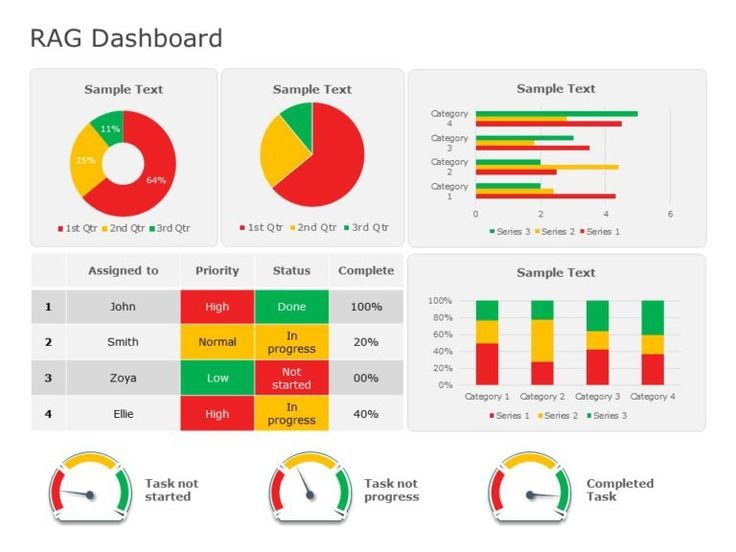
Picture a Monday operations meeting. The sales dashboard goes up on the wall screen, twenty tiles in a grid, each one coloured red, amber or green to show whether a region is on target. The director asks the room what needs attention this week, and most people point at the three red tiles straight away. One of the regional managers says nothing, because to him the red and the green tiles look much the same shade of brownish grey, and he has spent the last minute reading the small numbers underneath instead, working out for himself which ones are the problem.
He has plenty of company. The National Eye Institute in the United States puts colour vision deficiency at about one man in twelve. A peer-reviewed review in the journal Eye (Simunovic, 2010) gives a similar picture, with inherited colour vision deficiency affecting up to 8% of males and around 0.5% of females. In a company of 120 people, that is likely to be eight or nine colleagues, and there is a fair chance at least one of them sits in a meeting where a traffic-light dashboard is the main thing on the screen.
What the traffic lights look like to them
Colour vision deficiency, often called colour blindness although very few people see no colour at all, usually comes down to a weakness in one of the three types of light-sensitive cone cells in the eye. The two most common forms both affect the red and green cones, which is why red and green are the pair people have trouble telling apart. Pure red and pure green on a white background can often be separated by brightness alone. Problems start when a designer picks a softer palette, or when amber enters the picture, because amber sits between red and green and tends to collapse into both.
So a red, amber, green status column, with no other cue, asks a chunk of the audience to guess. They will usually guess correctly using context, or read the raw figures, or ask a colleague after the meeting. All of which takes time and attention that the dashboard was supposed to save.
The same visual breaks down for everyone else more often than people expect. Meeting-room projectors wash out saturated colours. A report printed on a black-and-white office printer turns every status into a grey square, and a phone screen outside on a bright afternoon does something similar. Designing for the one in twelve means the report survives those situations as well.
The grey text and the pale gridline
Contrast is the second accessibility fault in dashboards, and it catches far more readers than colour alone does.
The WebAIM Million, an automated survey of the top one million website home pages, found in its February 2026 run that 83.9% of them contained text with insufficient colour contrast, up on the 79.1% recorded a year earlier. Those are home pages built by professional web teams. Business dashboards are rarely built with that level of attention, and the default styling of many charting tools leans towards light grey axis labels, pale gridlines and thin pastel legends because they look clean on a designer’s large monitor.
On a wall screen three metres away, light grey on white vanishes. The reader can see the bars but not the months along the bottom, or the scale up the side, so a chart that looked tidy in Power BI Desktop becomes a set of coloured shapes with no reference points. The fix costs nothing: dark text on a light background, gridlines either dark enough to see or removed altogether, and legend labels in the same size and weight as body text. Labels that are only decoration can go, and the ones that carry meaning need to be legible at the distance the audience will read them.
Pair colour with shape, text or position
Nobody is suggesting dashboards go monochrome. Colour is a fast, pleasant signal for the roughly eleven in twelve who read it comfortably. The design rule, borrowed from web accessibility guidance, is that colour should never be the only way a piece of information is conveyed.
In practice that means three habits. Add a shape: an upward or downward arrow, a tick or a cross, a filled or hollow circle next to the colour. Write it out as text, because a tile that says “6% behind target” in words is readable by everyone, including the person reading it aloud on a conference call to colleagues who cannot see the screen. And use position, by sorting the table so the regions furthest behind sit at the top where the eye goes first, so the ordering itself tells the story without any colour at all.
There is a quick test for whether this has worked. Print the page in greyscale, or switch on the colour filter in Windows accessibility settings and set it to simulate deuteranopia (the most common red-green form). If the status of each item is still obvious, the design is sound. If every tile goes the same mid grey and nothing on the page tells you which region is behind, the colour was carrying the whole message.
Fewer numbers on the page
Accessibility and plain readability overlap more than people assume. A page with thirty figures on it is hard work for anyone, and it is harder still when some of those figures are differentiated only by a hue the reader cannot see.
A useful discipline is to decide, before opening the tool, what question this page answers and which three or four numbers answer it. Everything else moves to a second page or a drill-through (a click that opens the detail behind a figure). Each number then gets room: a readable label, a comparison with target or with last period written in words, and a colour cue backed up by one of the methods above. Red Eagle Tech has published a set of worked Power BI dashboard examples showing what this looks like when each page is organised around one decision rather than around everything the data happens to contain.
The result is often a report with more pages and less on each one, which can feel like a step backwards to anyone who grew up with the single giant spreadsheet tab. It reads faster in a meeting, and it reads at all for the colleague with colour vision deficiency.
Why this is learned fastest with someone critiquing your work
Everything above can be read in an afternoon. Turning it into habit is another matter, because the person building the report is also the person least able to see its faults. They know what the colours mean and which tile is the problem region, and they chose the pale grey because it looked elegant on their own monitor. The faults only show when somebody else sits in front of the report cold and tries to answer a question with it.
That is why report design sticks fastest in a hands-on setting where you build something and then have it pulled apart in front of you. Red Eagle Tech, a North London software and Power BI training company and a Microsoft Partner, runs this two-day course live online over Microsoft Teams, so delegates anywhere in the UK can join a small group where every exercise is built on real datasets and reviewed with the trainer. The sixth of its seven modules is given over to designing interactive reports, covering report design practice, custom visuals and row-level security (the permissions that control who sees which rows of data). The trainer has led Power BI training across a FTSE 100 company, the firm has trained more than 200 people, and Clutch named it a Top Power BI & Data Solutions Company in London for 2026. The fee is £600 + VAT per person.
The lasting lesson in that kind of session is usually the moment a colleague squints at your chart and asks what the grey line means, and you realise nobody had asked before.
A ten-minute check before the next meeting
Open the report you will present next week. Switch on the greyscale filter and look at it as the one in twelve will. Then zoom the browser out to roughly the size it will appear on the wall screen and see whether the axis labels are still readable where you sit. Whatever fails those two checks is the thing to fix first, and in most reports it is a single colour-only status column and one set of light grey labels. Both can be changed before Monday.

The Hidden Vulnerability of Smart Manufacturing (Industry 4.0)
The Disproportionate Cost of Transient Overvoltages
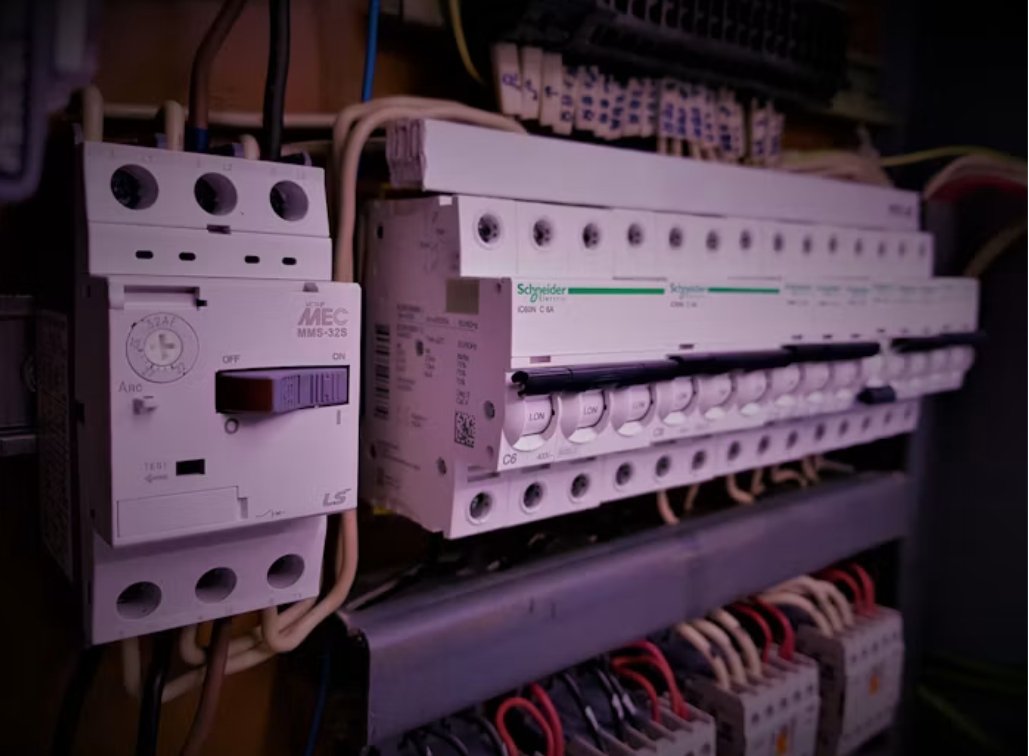
The transition to Industry 4.0 has transformed traditional factory floors into highly interconnected ecosystems. While this connectivity drives unprecedented efficiency, it introduces a severe Achilles’ heel: extreme sensitivity to electrical disturbances. Modern Programmable Logic Controllers (PLCs) and sensitive microprocessors operate at very low logic voltages, making them highly susceptible to electrical spikes.
In smart manufacturing environments, the integration of sensitive microprocessors and Industrial IoT (IIoT) sensors introduces a critical vulnerability to transient overvoltages. A single voltage spike from internal heavy machinery switching can cripple an entire automated production line.
To safeguard these critical assets, facility engineers must integrate an industrial-grade LSP at key power distribution nodes. These specialized components act as a critical defense layer, detecting voltage anomalies and instantly diverting destructive currents to the ground in nanoseconds, thereby preventing catastrophic downtime.
Internal grid switching, variable frequency drives (VFDs), and heavy machinery cycling are the primary culprits for these internal micro-surges. Without robust protection, the disproportionate cost of a single electrical transient can quickly exceed millions in halted production and damaged hardware.
How PLCs and Sensors Degrade Under Electrical Stress
Catastrophic failure is not the only threat facing smart manufacturing facilities. A more insidious problem is the silent, progressive degradation of electronic components when exposed to chronic, low-level electrical noise.
Continuous voltage fluctuations act as a form of electronic fatigue on semiconductor junctions. Over time, this constant electrical stress compromises the internal insulation of PLCs and optical sensors, significantly reducing their expected lifecycle.
- Dielectric breakdown: Continuous micro-surges slowly erode the insulating layers within integrated circuits.
- Data corruption: Electrical noise disrupts the binary logic, causing intermittent sensor misreadings.
- Thermal fatigue: Frequent clamping of minor overvoltages generates heat, degrading the physical solder joints.
Facility managers must recognize that a lack of immediate hardware failure does not equate to a healthy electrical environment. Unmitigated stress guarantees premature system mortality.
Designing a Robust Power Quality Strategy
Implementing Zonal Protection (LPZ Concept)
To properly shield an automated facility, electrical architects utilize the concept of Lightning Protection Zones (LPZ). This engineering framework divides a manufacturing plant into specific zones based on their exposure to electromagnetic threats.
Rather than relying on a single point of defense, the LPZ strategy employs cascading protection. It isolates different factory sections, preventing electrical failures from propagating through the entire grid.
- LPZ 0 to LPZ 1: The transition at the main service entrance, intercepting massive external surges.
- LPZ 1 to LPZ 2: Sub-distribution panels isolating heavy machinery from sensitive control rooms.
- LPZ 2 to LPZ 3: Terminal protection directly at the input of highly sensitive IIoT assets.
By physically and electrically compartmentalizing the factory, engineers can effectively quarantine electrical transients before they reach mission-critical assembly lines.
Proper Grounding Techniques in Industrial Automation
Standard commercial grounding is entirely insufficient for the complexities of a smart factory. In Industry 4.0, a highly engineered, low-impedance grounding system is the foundational prerequisite for all surge protection and data integrity.
In complex Supervisory Control and Data Acquisition (SCADA) networks, improper grounding frequently creates devastating ground loops. These loops occur when different parts of a communication network are grounded at slightly different potentials, driving unwanted current through data cables.
- Single-Point Grounding: Essential for low-frequency sensitive equipment to prevent circulating currents.
- Equipotential Bonding: Creating a uniform baseline potential across all metallic chassis and conductive structures.
- Shielding and Routing: Physically separating power cables from data transmission lines to prevent inductive coupling.
Predictive Maintenance and System Resilience
Real-Time Power Monitoring Protocols
In modern energy management, reacting to an outage is an obsolete strategy. Predictive maintenance leverages real-time data to identify developing electrical anomalies long before they trigger physical damage or system shutdowns.
By deploying smart meters and advanced power quality analyzers, facility directors can continuously monitor the health of the plant’s electrical infrastructure. This proactive stance ensures that power quality remains within the strict tolerances required by automated machinery.
- Harmonic Analysis: Tracking non-linear loads that distort the pure sinusoidal waveform of the AC power.
- Voltage Sag/Swell Monitoring: Detecting grid instability that could cause machinery to misfire or stall.
- Transient Logging: Recording the frequency and magnitude of micro-surges to assess the remaining lifespan of existing protection devices.
Regulatory Compliance and Factory Safety Standards
Aligning with International Electrotechnical Frameworks
Implementing a resilient electrical infrastructure goes beyond mere asset protection; it is inherently tied to global operational compliance. Modern automated factories must adhere to stringent codes to ensure worker safety and maintain international certifications.
By strictly following the global standards for electrotechnical safety and power quality, plant managers can establish a baseline for electrical reliability that satisfies both operational demands and rigorous regulatory audits.
Adherence to definitive engineering blueprints—such as those published by the IEC (International Electrotechnical Commission) and IEEE—guarantees that a facility’s power protection strategy is scientifically validated. Compliance is not just a legal formality; it is the ultimate assurance of a factory’s long-term operational resilience.

Key Takeaways
· A POS system today means far more than a till: stock control, staff management, customer records and sales reporting all run through the same platform.
· Mobile wallet use has climbed to 65% of UK adults according to UK Finance’s 2025 Payment Markets Report, so fast tap-to-pay handling is now a basic requirement, not a bonus feature.
· Terminal, tablet and mobile card reader setups all count as POS systems, and the right hardware choice depends on whether you trade from a fixed counter, a table or a market stall.
· Zettle by PayPal, POSApt, Shopify POS, Nobly POS and TouchBistro each suit a different type of UK business, from mobile sellers to full-service restaurants.
· Total cost includes card processing rates and hardware, not just the monthly software fee, so compare the full package before choosing a provider.
What a POS System Actually Does for a Business
A point of sale system is simply wherever a sale gets completed, but the software behind that moment has grown well past a cash drawer and a receipt roll. Modern POS platforms run stock levels, staff rotas, customer records and sales data from one screen, and most sync that information to the cloud so an owner can check takings from a phone rather than waiting to get back to the shop.
From Cash Register to Full Business Platform
A cash register could add up a sale and print a receipt. It could not tell a shop owner which supplier delivery is overdue, or flag that a particular till operator processes an unusual number of voids. A modern POS system does both automatically, turning routine transactions into a running record of how the business actually performs.
Terminal, Tablet and Mobile POS Explained
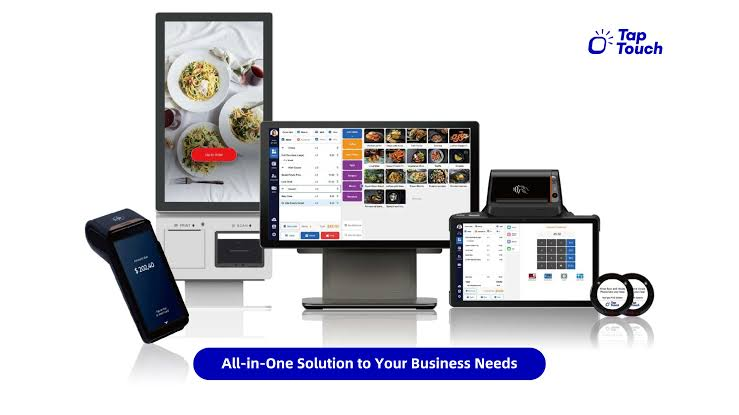
Fixed terminals still suit businesses with a permanent counter and consistent footfall, such as a busy convenience store. Tablet-based systems running on an iPad or Android device, also called mobile POS, have become the more common choice for independent shops, cafes and salons, largely because the hardware is cheaper and easier to replace. Mobile card readers paired with a phone app cover market stalls, food trucks and any trade that moves between locations during the week.
What UK Businesses Should Prioritise in 2026
Fast, Reliable Card Payments
Cash use keeps falling, and a POS system that fumbles a contactless payment during a queue costs more than the transaction itself in lost goodwill. With the contactless limit at £100 per transaction, customers increasingly expect to tap for larger purchases too, so terminal speed and reliability deserve more attention than they usually get in a sales demo.
Data You Can Act On
Sales reports only matter if someone actually reads them and changes something as a result. Before choosing a system, check whether its reporting flags the details that matter for your business specifically, such as which product lines are underperforming or which shift consistently runs short on stock, rather than only showing a total revenue figure.
Matching a POS System to Your Type of Business
Retail and E-Commerce Businesses
A retailer selling both in-store and online needs stock levels that sync in both directions in real time. Selling the last unit of a product in-store should remove it from the website automatically, and vice versa, otherwise a business ends up fulfilling orders it cannot actually complete.
Restaurants, Cafes and Bars
Hospitality trading depends on speed at the till and accuracy in the kitchen. A kitchen display system that replaces printed dockets, split-bill handling for group tables, and quick modifier options for allergies or special requests all matter more here than they do for a typical retail shop.
Salons and Service Businesses
A salon, barber shop or clinic runs on appointments rather than walk-in footfall, so booking calendars, deposit handling and client history matter more than barcode scanning ever will. Loyalty tools that recognise a returning client automatically tend to earn their cost back quickly in this category, since repeat custom drives most of the revenue.
Mobile and Pop-Up Traders
A trader working markets, festivals or pop-up events needs a system built around a phone or small card reader rather than a fixed terminal, along with a genuinely reliable offline mode for locations with patchy signal. Battery life and portability count for as much as software features in this category.
Best POS Systems for UK Businesses
The five systems below were chosen to represent distinct trading styles rather than one narrow type of business, so most UK businesses should recognise their own setup somewhere on this list.
1. Zettle by PayPal
Zettle by PayPal grew out of a simple card reader business and still shows that heritage in how quickly a new user can start taking payments. It suits small retailers, market traders and service businesses that want straightforward hardware and a fast setup, backed by PayPal’s existing payment infrastructure.
2. POSApt
POSApt runs on standard Android-based terminals, which keeps hardware costs down for independent shops, cafes, salons and takeaways that do not want to commit to proprietary terminals. Its focus on UK-based support and tablet POS setups makes it a practical option for a business that wants a lower-cost entry point without giving up the reporting and stock features a full ePOS system provides.
3. Shopify POS
Shopify POS is the natural choice for a retailer already running a Shopify online store, since stock, orders and customer records sync between the website and the till without extra integration work. Businesses without an existing Shopify presence may find less benefit unless they are planning an online store alongside their physical shop.
4. Nobly POS
Nobly POS is a UK-founded system built with independent cafes, restaurants and delis in mind, offering table management and kitchen printing alongside standard sales reporting. Its UK roots show in features aimed squarely at how British hospitality businesses actually trade, rather than a system adapted from an overseas retail template.
5. TouchBistro
TouchBistro focuses specifically on full-service restaurants, with table-side ordering, menu management and staff scheduling built around a dining room rather than a retail counter. It suits a restaurant that needs deeper hospitality-specific tools more than a general-purpose retail and hospitality hybrid system.
What a POS System Costs in Practice
The Headline Fee Rarely Covers Everything
Monthly software fees usually range from a free entry-level tier to a per-till subscription, but that is rarely where most of the cost sits. Card processing rates, optional hardware bundles, and premium support tiers can add up to more than the software subscription itself over a year of trading. Ask any shortlisted provider for the full blended cost based on your actual average monthly card takings, not a generic example figure from their website.
Watch for Costs That Only Appear Later
Setup fees, payment terminal rental charges and early-termination penalties often sit outside the headline pricing table and only surface once a contract is already signed. Asking for these figures in writing before committing saves an awkward conversation with a provider a year into a contract you did not fully understand at the outset.
Setting Up a New POS System Properly
Migrating Stock and Customer Data
Loading an existing product list, prices and customer records into a new system is usually the slowest part of a switch, not the software itself. Ask a shortlisted provider exactly how they handle data migration and whether it is included in the setup fee, since a manual re-entry job across hundreds of stock lines can eat several days of admin time.
Training Staff Before Launch Day
Staff who have only seen a new till screen for five minutes tend to slow down service on launch day, which is exactly when a new system needs to make a good first impression. A short, hands-on training session covering sales, refunds and stock look-ups avoids most of the early friction, and it costs far less time than firefighting confused staff during a lunchtime rush.
Switching POS Providers Without Losing Data
A business is rarely stuck with a first choice forever, but switching gets harder the longer a provider holds your sales history, customer records and stock data. Before signing with any provider, ask exactly how data export works and in what format, so a future switch is a planned decision rather than a forced scramble because a contract renewal went badly.
Frequently Asked Questions
Do I need a POS system if I only sell online?
Not in the traditional sense, though many online-only sellers still benefit from a lightweight POS setup for markets, pop-ups or a future physical location. If a business plans to open any kind of in-person selling channel eventually, choosing a POS provider that also handles online orders from day one avoids running two disconnected systems later.
What is the difference between a POS system and an ePOS system?
In practice, very little. POS is the general term for wherever a sale is completed, while ePOS specifically means a computerised system with built-in stock and reporting tools. Almost every system sold as a “POS system” in the UK today is technically an ePOS system.
How much does a POS system cost for a small UK business?
Costs range from free plans built around a basic card reader to monthly subscriptions for multi-till retail setups, before card processing fees are added. The realistic way to compare providers is the total monthly cost at your typical trading volume, not the advertised starting price.
Can I use one POS system across a shop and a market stall?
Yes, provided the system supports both a fixed terminal and a mobile card reader on the same account, with stock and sales syncing between them. This matters more than it first seems, since running two separate systems for one business usually means reconciling two sets of sales figures by hand at the end of the week.
Final Thoughts on Choosing a POS System
The best POS system for a business is the one built around how that business actually trades day to day, not the one with the longest feature list. A market trader, a restaurant and a multi-site retailer are better served by different systems entirely, so match the platform to the trading pattern first, then compare pricing across two or three shortlisted providers before committing to a contract.

The Ultimate Office Spring Cleaning Checklist for Small Businesses

Optimizing Industrial Packaging Automation: Technical Standards, Electrical Safety, and Line Efficiency

What Are the Effects of Too Much Sun Exposure?

How to Keep a Useful Menstrual Health Diary

7 Meaningful Ways to Preserve Memories From Your Favorite Trips

Who Is Indiana Urban? Inside the Life of Karl Urban’s Son and Rising Actor

Jennifer Seyfried: All About Amanda Seyfried’s Sister, Her Life and Career

Who Is Zachary Hudson? Inside the Private Life of Cindy Williams’ Son

Who Is Stephen G. Walker? All About PinkPantheress’ Father and His Academic Career

Cynthia Womack Biography: The Life, Career, and Legacy of Connie Britton’s Twin Sister
Who Is Indiana Urban? Inside the Life of Karl Urban’s Son and Rising Actor
Jennifer Seyfried: All About Amanda Seyfried’s Sister, Her Life and Career
Who Is Zachary Hudson? Inside the Private Life of Cindy Williams’ Son
Who Is Stephen G. Walker? All About PinkPantheress’ Father and His Academic Career
Cynthia Womack Biography: The Life, Career, and Legacy of Connie Britton’s Twin Sister
-
Biography7 months ago
Who Is Indiana Urban? Inside the Life of Karl Urban’s Son and Rising Actor
-
Biography7 months ago
Jennifer Seyfried: All About Amanda Seyfried’s Sister, Her Life and Career
-
Biography7 months ago
Who Is Zachary Hudson? Inside the Private Life of Cindy Williams’ Son
-
 Biography6 months ago
Who Is Stephen G. Walker? All About PinkPantheress’ Father and His Academic Career
-
Biography8 months ago
Cynthia Womack Biography: The Life, Career, and Legacy of Connie Britton’s Twin Sister
-
 Biography7 months ago
Who is Lynn Levesque? Everything to Know About Triple H’s Sister
-
 Biography8 months ago
Who Was Gretchen Knauff? The Private Life of Jennifer Coolidge’s Mother
-
 Biography7 months ago
Lynn Payne: Inside the Life and Love Story of Randy Savage’s Wife